
Follower Guard was developed with the main objective of protecting follower accounts in situations that may occur during trades — situations that are inherent to the market and beyond our control — by disarming the follower or, in simpler cases, visually informing you that a follower account is out of sync with the leader.
Follower Account States
Follower accounts have four states, each shown in a different color:
The four follower account states and their colors.
- Out of sync (yellow)
- On (green)
- Off (gray)
- Disarmed (red)
Disarmed or disconnected follower accounts will not receive trade copies. Only connected (On) and Out of sync follower accounts continue to receive trades from the leader account.
The synchronization check only takes place on enabled (On) follower accounts, and only whenever the positions of the leader and follower accounts change.
Out of Sync Status
If a follower account has an open position while the leader account is flat, for example, the system informs you visually with a yellow color next to the follower account. Yellow means the follower is out of sync compared to the leader, but will continue to receive trades as normal.
Yellow indicates the follower is out of sync with the leader but still receiving trades.
With this, the trader knows there is a divergence between account positions and can trigger the follower Flatten button or take any other action they wish.
How Replikanto Decides a Follower Is Out of Sync
About half a second after the positions stop changing, Replikanto compares each follower that is On with the leader, on the tab's instrument (or on the follower's Cross Order instrument). It checks two things: the follower's direction (long, short or flat) and its quantity, against the quantity the tab's Copy Method says that follower should hold. A mismatch in either one marks the row Out of sync.
Starting with Replikanto 1.7.0.0, the quantity check depends on the Copy Method:
- Exact Quantity and a whole-number Ratio (1, 2, 3...): the follower must hold exactly the expected quantity.
- Ratio with decimals (for example 0.5 or 1.5), Available Cash, Net Liquidation, and Pooled Quantity with more than one follower in the pool: Replikanto sizes each leader entry separately and rounds it down, so a follower that scaled in behind several leader orders can correctly hold a little less than the figure calculated from the leader's whole position. Replikanto tolerates that rounding: up to one contract less for each additional leader entry behind the current position. Holding more than expected is still flagged. Pooled Quantity with a single follower is compared exactly.
- Pre Allocation: the expected quantity is the allocation multiplied by the number of leader entry orders behind the current position, so a follower that followed two leader entries is expected to hold twice the allocation. A shortfall smaller than one whole entry is tolerated. After a NinjaTrader restart, a reconnection, a partial exit by the leader, or a change of the tab's leader account or instrument, only the direction is checked until the leader is flat again.
- Pct Change: never marked Out of sync. This method adds to or reduces the position the follower already holds, so there is no "correct" size or direction to derive from the leader. As a result, neither Follower Guard flatten action ever fires for a Pct Change follower.
Also not flagged: a follower with a negative Ratio (its direction is inverted before the comparison), and a flat follower whose calculated size is 0 contracts.
In rare cases with a Ratio with decimals, after the leader exits part of its position, a correctly copied follower can still be marked Out of sync. To see why any row was marked, open the NinjaTrader Log tab and look for the Info [1064] line for that follower. It shows reason='direction' or reason='quantity' and the numbers on both sides (leader quantity, follower quantity and expected quantity).
Older versions: before Replikanto 1.7.0.0, followers on Ratio, Available Cash, Net Liquidation, Pooled Quantity, Pct Change or Pre Allocation could be marked Out of sync while correctly positioned, and with Flatten the follower if it becomes out of sync enabled, Follower Guard closed and disarmed them. If this happens to you, update to Replikanto 1.7.0.0 or later.
Follower Guard Configuration
The Follower Guard configuration can be accessed from the Replikanto Properties Menu:
Replikanto Properties Menu — where the Follower Guard settings live.
In the Follower Guard group you will see all the available options.
The Follower Guard group and its available options, including the email fields.
In the first two lines you can configure your email address and the subject of the email you will receive if one or more follower accounts are disarmed. You must configure an email account as a default "Mail" Share Service in the NinjaTrader General Options. When configured, Replikanto sends an email notification whenever a follower is disarmed. This lets you know when intervention may be needed, especially useful when running trades unattended. Prerequisite: NinjaTrader must be configured to send emails before this field has any effect. In NinjaTrader, go to Tools > Options > General and fill in the "Email log alert messages to" field. You also need to set up a mail account under Share Services in that same section. Once both are configured, disarm alerts will be sent automatically.
Email Alert Example
The email address and subject fields in the Follower Guard group.
In the event of an automatic follower disarm, you will receive an email just like this one.
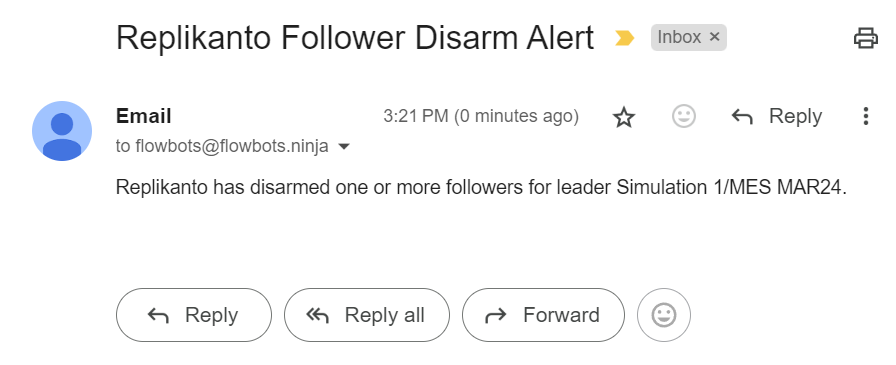
Example of the disarm alert email.
Follower Guard Actions
Now let's look at all the Follower Guard actions.
The first action is executed if the follower order is not filled by the market after the leader order is filled. It waits 5 seconds — or the number you define — before acting.
Action for when the follower order is not filled after the leader order.
This action, Cancel the follower entry order if it is not filled, cancels only a follower entry that has not received any fill yet; a partially filled entry is left in place. Together with the entry, Replikanto cancels the exit orders (stop and target) that this tab copied for that entry on the same instrument. Starting with Replikanto 1.7.0.0, the follower account's other working orders (on another instrument, placed manually, or copied by another Replikanto tab) are left in place. If Disarm Followers is checked, the follower is also disarmed.
The next action is executed if the follower becomes out of sync with the leader. Here you can also set a time before the action takes place (this action flattens the follower account).
Action for when the follower becomes out of sync (flattens the follower).
How the timer of Flatten the follower if it becomes out of sync works (default 10 seconds):
- It is a grace period: if the follower comes back in sync before the time is up, nothing is sent.
- Each execution the follower receives on the instrument while it is Out of sync restarts the countdown, so a follower that is still being filled in parts is not flattened while it catches up.
- Starting with Replikanto 1.7.0.0, connection or account updates from other, unrelated brokers and accounts no longer restart the countdown. Before, they could keep postponing the action.
- When the time is up, Replikanto checks the follower again and flattens it only if it is still Out of sync and still has a position or a working order on that instrument. Then, if Disarm Followers is checked, the follower is disarmed.
On Rithmic accounts, starting with Replikanto 1.7.0.0, Follower Guard first re-reads the account's real position from the broker (no order is sent), so a stale position shown by NinjaTrader does not trigger the wrong action. This is the Refresh a Rithmic account's position before acting on it option in Properties, General (on by default).
On other connections (Sim, Tradovate and others), starting with Replikanto 1.7.1.0, the two Follower Guard timers that flatten a follower, Flatten the follower if it becomes out of sync and Flatten the follower if its position is in the opposite direction (described below), first make sure NinjaTrader has finished applying the follower's latest activity to its position. On each tick of the timer, Follower Guard postpones the flatten if the follower has a fill that NinjaTrader has not applied yet, a market order still in flight, or a position that changed less than a second ago. While it waits:
- The follower is not flattened and not disarmed. It stays Out of sync (yellow), and Follower Guard checks again on the next tick, for up to about 30 seconds in the same episode. If the delay you set is longer than that, it acts on the next tick.
- The Log tab shows
Info [1119]once per episode: "The Follower Guard did not flatten this follower yet: NinjaTrader has not finished applying its latest fill or market order to the position, so the position it shows may be out of date." The line ends withguard='out-of-sync'orguard='opposite-direction'and areasonoffill-pending,order-in-flightorposition-settling. It needs no action: Follower Guard is waiting on purpose. - If the follower comes back in sync, or is turned off or disarmed in the meantime, nothing is flattened.
- If after about 30 seconds NinjaTrader still has not updated the position, Follower Guard acts on the position NinjaTrader shows, and the Log tab shows
Warning [1120]: "The Follower Guard waited N s for NinjaTrader to finish applying this follower's fills and orders to its position and it still had not, so it acts now on the position NinjaTrader shows, as it did before 1.7.1.0. Check this follower after the flatten." The phrase "as it did before 1.7.1.0" means it acts the way Follower Guard did before this wait existed. After such a flatten, compare the follower's position with your broker.
This wait applies only to those two options, and only when they are enabled (both are off by default). It does not apply to Rithmic accounts, which use the position re-read described above, and it does not apply to the other flatten paths: the order-error actions below, Flatten All, a follower's own Flatten button (X) and a Close copied from the leader. Flatten All, the Flatten button (X), a copied Close and the Follower Guard flatten itself (once its own wait ends) wait up to about 5 seconds inside the flatten for NinjaTrader to apply the follower's latest fill to its position before the Close is sent (the Log tab shows Info [1110]).
Older versions: before Replikanto 1.7.1.0, the two timers decided on the position NinjaTrader showed at the moment they elapsed. On a connection that applies fills late (for example Tradovate), a follower could be flattened on an out-of-date position. If this happens to you, update to Replikanto 1.7.1.0 or later.
From version 1.5.3+ there is an action to flatten the follower account if it opens a position opposite to the one it should have.
From v1.5.3+, action for when the follower opens an opposite position.
This action, Flatten the follower if its position is in the opposite direction (default 5 seconds), acts only when both the leader and the follower hold a position, on opposite sides; a quantity difference alone never triggers it. Its countdown is also restarted by each follower execution. On connections other than Rithmic, starting with Replikanto 1.7.1.0, it also waits for NinjaTrader to apply the follower's latest fill, as described above; after it has waited, it re-reads the leader's and the follower's positions live on each tick and flattens only if they are still on opposite sides.
The next actions (which also flatten the follower account) can be enabled and come into play after a certain time:
- Broker rejected the current order
- Unable to submit order
- Either the exchange or broker does not support order updates for the instrument in question, or the order has not yet been submitted
- Order cannot be canceled now, but may be successfully canceled later
- The order was sent with an unspecified error
Broker / exchange error conditions that can trigger an auto-flatten.
Starting with Replikanto 1.7.0.0, if a change to a follower order fails because that order had just been filled or cancelled, Follower Guard no longer flattens the follower for it (Flatten follower if the changing order submitted returns in error). The Log tab shows Info [1048] instead.
When enabled, all Follower Guard actions come into effect after the set time and will disarm follower accounts if the Disarm Followers option is checked (we will show how to disable that trigger below). When a follower account is disarmed, a message is displayed, an email is sent if configured, and the account turns red.
Disarmed Account and Rearm Function
A message is displayed when a follower account is disarmed.
The Rearm button is enabled after an account has been disarmed. Starting with Replikanto 1.7.0.0, the Rearm button is shown only when Disarm Followers is checked or a follower is Disarmed. If Disarm Followers is unchecked and no follower is Disarmed, the button is hidden.
The Rearm button becomes available after an account is disarmed.
To rearm follower accounts you can use the Rearm button, the Flatten All button, or the individual follower account's Flatten button (X). Starting with Replikanto 1.7.1.0, when the Follower Accounts list is shown in groups (Group followers by connection, or custom groups), a group's header also has its own Rearm button, which appears while the group has a Disarmed account. It re-arms only the Disarmed accounts of that group that are flat; an account that still shows a position stays Disarmed and is listed in a message. The header's Flatten button (X) asks for confirmation and then flattens every follower account of that group, whatever its status; afterwards it re-arms a Disarmed account only if its position reads flat. When there are remote Replikantos, rearming follower accounts on the remote computer must be done from the follower Replikanto window — the leader Replikanto cannot rearm remote follower accounts.
Starting with Replikanto 1.7.0.0, Flatten All re-arms a Disarmed follower only if its position already shows flat. A follower that still shows a position (for example, because its closing order is still working) stays Disarmed, and the Log tab shows Warning [1073]. Check that account's position in NinjaTrader and, once it is flat, click Rearm.
Auto-Disarm Toggle
The automatic disarming of follower accounts described above can be turned off via the Replikanto menu or the Replikanto Properties window.
Replikanto menu to enable or disable follower auto-disarm.
Replikanto properties to enable or disable follower auto-disarm.
If you turn off Disarm Followers and no follower is Disarmed, the Rearm button is hidden (starting with Replikanto 1.7.0.0).
Some Follower Guard actions may not work on remote machines that receive trades remotely, because they are unable to check the status of the leader's position.
Remote Nodes
Replikanto nodes only show whether the node is off (gray), on (green), or away (red).
Remote node states: on (green), off (gray), away (red).
- On (green)
- Off (gray)
- Away (red)
A node is “away” when a trade was not received or returned an error.
A node (network or remote node) will be "away" when it is detected that it did not receive a trade, or it received it but returned an error (the log should be checked in all situations). Even when away, new attempts are made — but the trader will know so they can act to correct the communication error.
For remote nodes that are away, the recommendation is to turn them off until the problem is resolved, so that credits are not used up without the copy being delivered.
Comments
0 comments
Article is closed for comments.